Terrain User Guide v1.2
What is Terrain? Concept
Terrain is a circular spectrogram you can play like an instrument. You place grains on a ring, shape their timing and motion, and listen as the audio becomes a navigable landscape.
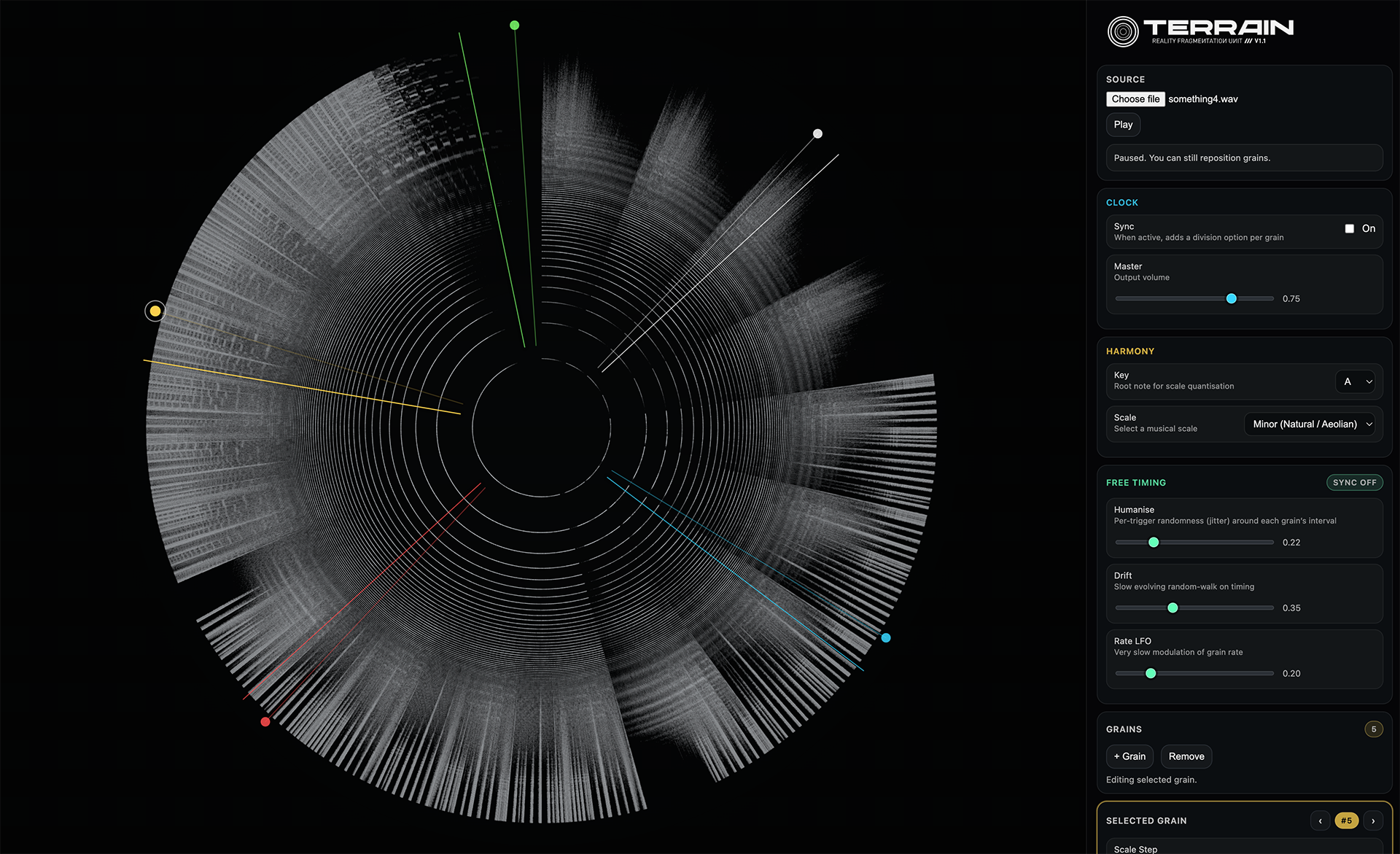
How Terrain Works Foundations
Time is circular
The audio file wraps around the circle. The top (12 o’clock) is the start of the file.
Frequency is radial
Low frequencies sit near the centre, high frequencies near the outer edge.
Grains repeat
Each grain triggers repeatedly and plays a short slice of audio.
Two timing modes
Sync ON uses musical divisions. Sync OFF uses millisecond timing.
Quick Start 2 minutes
- Load a sample (or use the default).
- Hit Play (most browsers require a click/tap before audio starts).
- Drag a grain handle around the ring to change where it listens.
- Turn Wander on for movement.
- Add a little Delay and Reverb for space.
- Enable Reverse on one grain to create a tension layer.
Stage (Spectrogram) Primary UI
The stage shows a circular spectrogram of the loaded audio and the active grains.
- Grain handle (circle): drag to move a grain’s centre position around the ring.
- Grain needle (line): shows the grain’s current playback position (moves with Wander/Random).
- Selection ring: the selected grain handle is highlighted.
- Trigger flash: a brief pulse on the needle when a grain fires.
When a grain’s Reverse checkbox is enabled, its handle flips to the inner end of its stalk. When Reverse is disabled, the handle remains on the outer end.
Clock Global timing
Sets the master timing behaviour and overall output level.
- Sync (toggle): when ON, grains run on musical divisions. When OFF, grains run on millisecond timing + Free Timing behaviours.
- Tempo (BPM): shown only when Sync ON or Random ON (because BPM drives those modes).
- Master: global output volume for the entire mix.
Harmony Pitch rules
Defines the musical framework used by grains when you change Scale Step.
- Key: sets the root note.
- Scale: selects the scale used for quantising pitch movement.
Harmony changes sound behaviour but does not change the spectrogram visuals.
Free Timing Sync OFF only
When Sync is OFF, grains can behave less like a sequencer and more like weather: timing jitters, drifts, and slowly evolves.
- Humanise: adds per-trigger jitter around the grain’s interval.
- Drift: adds a slow random-walk bias to timing over time.
- Rate LFO: slowly modulates grain timing across long periods.
Grains Managing grains
Create, select, and remove grains. Terrain supports up to 8 grains.
- Grain count: shows how many grains exist.
- + Grain: adds a new grain (disabled if no audio is loaded or max grains reached).
- Remove: removes the currently selected grain (disabled if none selected).
Selected Grain Appears on selection
This section appears only when a grain is selected. It controls one grain at a time.
Timing
- Division (Sync ON): sets retrigger division against the BPM grid.
- Rate (Sync OFF): sets retrigger interval in milliseconds.
Pitch
- Scale Step: moves pitch in scale degrees (uses the Harmony section’s Key/Scale).
- Fine: adds fine detune in cents.
Placement + Level
- Pan: stereo position (scaled by global Width).
- Length: grain duration.
- Gain: per-grain volume.
Reverse (v1.2)
- Reverse: plays the grain’s audio slice backwards (per grain).
- Visual: when enabled, the grain handle flips to the inner end of the stalk.
Filter
- Filter Type: High-pass or Low-pass.
- Cutoff: cutoff frequency (range updates based on filter type).
- Filter LFO Amount: how far the cutoff moves.
- Filter LFO Rate: how fast the cutoff moves (shown as a time label).
Filters affect sound only (no spectrogram visual changes).
Spatial Global stereo
Controls stereo behaviour shared by all grains.
- Width: scales how far pan can spread (0 = mono, 1 = full stereo).
- Spray: adds a tiny random start-position offset per grain trigger.
Motion Movement
Controls how grains move around the ring over time.
- Wander (toggle): grains drift around their placed positions.
- Distance (Wander ON): how far grains travel.
- Speed (Wander ON): how quickly they drift.
- Random (toggle): periodically randomises grain centre positions.
- Random Smooth (Random ON): how long the random jump takes (smooth transition time).
Wander and Random cause grain needles to move around the ring. Random can also relocate a grain’s centre over time.
Delay Global FX
A global echo effect applied to the entire mix (all grains). Useful for rhythmic trails, smearing motion, and building density.
- Mix: how much delayed signal is blended in.
- Time: delay time in seconds (spacing between repeats).
- Feedback: how much repeats feed back into themselves (repeat length / density).
- Tone: low-pass filter in the feedback loop (darkens repeats).
Reverb Global FX
A global space effect that adds depth and ambience. Terrain generates an impulse-style reverb so it can range from subtle bloom to huge atmospheric tails.
- Mix: how much reverb is blended in.
- Decay: tail length in seconds.
- Pre-delay: time before the reverb blooms, helping preserve clarity.
Gestures & Shortcuts Interaction
- Select grain: tap/click a grain handle.
- Move grain: drag the handle around the ring.
- Add grain: double-click / double-tap an empty area of the ring.
- Clear selection: tap/click empty space (not a handle).
Visual Language Reading the stage
- Colour: each grain has a colour; the Selected Grain panel adopts the selected grain’s accent.
- Handle position: shows grain centre. With Reverse ON, the handle flips inward (v1.2).
- Needle line: indicates current playback position for the grain.
- Flash: a grain triggering is shown as a brief pulse.
Creative Recipes Starting points
- Sync OFF
- Long Length
- Slow Rate + a little Drift
- Wander ON (low Distance)
- Reverb Mix up, long Decay
- Sync ON
- Different Divisions per grain
- Shorter Length
- Delay Time in a musical range
- Try one Reverse grain as “counter-rhythm”
Audio RoutingBlackhole
TERRAIN is a browser based instrument, to route the audio to other applications I recommend Existential Audio BlackholeKnown IssuesTo be fixed
- Switching Sync on/off can cause some clicking sounds in the audio as the grains lock to position. To avoid this, pause the audio before switching sync on/off
- Short grain lengths can sometimes introduce a popping/clicking sound in the audio.
Videos Demos
More videos at Noise Journal /// Updated frequently